API (Application Programming Interface) merupakan sekumpulan aturan dan protokol yang memungkinkan aplikasi berbeda platform untuk berkomunikasi dan saling terintegrasi.Penggunaan API begitu penting karena sebagai media untuk komunikasi antara aplikasi yang berbeda. Dalam era digital saat ini, hampir semua aplikasi modern menggunakan API untuk:
- Integrasi dengan layanan pihak ketiga
- Memisahkan frontend dan backend
- Mendukung multiple platform (web, mobile, desktop)
- Memungkinkan microservices architecture
Langkah-Langkah
Berikut adalah langkah-langkah untuk menerpakan RESTful API pada project Laravel menggunakan POSTMAN
Pada tutorial ini, kita akan membuat sebuah project CRUD sederhana menggunakan Laravel. Buat sebuah project laravel baru atau di project laravel yang sudah ada (pada tutorial ini kita akan membuat project laravel baru dan akan membuat project CRUD sederhana)
Pertama, kita akan membuat migrasi databasenya. untuk membuat migrasi, gunakan kode berikut di terminal: php artisan make:migration create_products_table
kemudian, isi function up() dengan kode berikut
Schema::create('products', function (Blueprint $table) {
    $table->id();
    $table->string('name');
    $table->text('description');
    $table->decimal('price', 10, 2);
    $table->integer('stock');
    $table->timestamps();
});Setelah itu jalankan migrasi dengan kode php artisan migrate di terminal.
Kemudian, buat model product dengan kode php artisan make:model Product di terminal, kemudian isi dengan kode berikut:
class Product extends Model
{
    protected $fillable = [
        'name', 'description', 'price', 'stock'
    ];

    protected $casts = [
        'price' => 'decimal:2'
    ];
} Kemudian buat API Routes untuk website kita dengan kode php artisan install:api di terminal
Lalu, buat di file routes/api.php kode berikut:
Route::apiResource('products', ProductController::class);

// manual:
Route::get('products', [ProductController::class, 'index']);
Route::post('products', [ProductController::class, 'store']);
Route::get('products/{product}', [ProductController::class, 'show']);
Route::put('products/{product}', [ProductController::class, 'update']);
Route::delete('products/{product}', [ProductController::class, 'destroy']);Setelah itu, buat controller dengan nama ProductController dengan kode php artisan make:controller ProductController --api pada terminal, lalu isi controller dengan kode berikut
class ProductController extends Controller
{
    public function index()
    {
        $products = Product::all();
        return response()->json([
            'status' => 'success',
            'data' => $products
        ]);
    }

    public function store(Request $request)
    {
        $validated = $request->validate([
            'name' => 'required|string|max:255',
            'description' => 'required|string',
            'price' => 'required|numeric|min:0',
            'stock' => 'required|integer|min:0'
        ]);

        $product = Product::create($validated);

        return response()->json([
            'status' => 'success',
            'message' => 'Product created successfully',
            'data' => $product
        ], 201);
    }

    public function show(Product $product)
    {
        return response()->json([
            'status' => 'success',
            'data' => $product
        ]);
    }

    public function update(Request $request, Product $product)
    {
        $validated = $request->validate([
            'name' => 'sometimes|string|max:255',
            'description' => 'sometimes|string',
            'price' => 'sometimes|numeric|min:0',
            'stock' => 'sometimes|integer|min:0'
        ]);

        $product->update($validated);

        return response()->json([
            'status' => 'success',
            'message' => 'Product updated successfully',
            'data' => $product
        ]);
    }

    public function destroy(Product $product)
    {
        $product->delete();

        return response()->json([
            'status' => 'success',
            'message' => 'Product deleted successfully'
        ]);
    }
}Kemudian, kita akan membuat API Resource. Fitur yang memungkinkan untuk mentransformasi model data atau collection menjadi format JSON yang konsisten dan mudah dikustomisasi untuk API response. API Resource berfungsi sebagai layer transformasi antara model Eloquent dan JSON response yang dikirim ke client sehingga dapat digunakan untuk Mengontrol format output JSON, Menyembunyikan field sensitive, Menambahkan field computed dan Membuat response yang konsisten.
Ketik php artisan make:resource ProductResource pada terminal. Kemudian isi dengan kode berikut:
class ProductResource extends JsonResource
{
    public function toArray($request)
    {
        return [
            'id' => $this->id,
            'name' => $this->name,
            'description' => $this->description,
            'price' => $this->price,
            'stock' => $this->stock,
            'created_at' => $this->created_at->format('Y-m-d H:i:s'),
            'updated_at' => $this->updated_at->format('Y-m-d H:i:s')
        ];
    }
}Untuk menggunakan resource yang telah dibuat di controller, ubah function index() dan show() di ProductController seperti berikut:
public function index()
{
    $products = Product::all();
    return ProductResource::collection($products);
}

public function show(Product $product)
{
    return new ProductResource($product);
}Selanjutnya, kita akan membuat validasi dan error handling. Pertama, kita akan membuat Form Request Validation. Gunakan kode php artisan make:request StoreProductRequest di terminal. Kemudian masukkan kode berikut di file app/Http/Requests/StoreProductRequest.php
class StoreProductRequest extends FormRequest
{
    public function authorize()
    {
        return true;
    }

    public function rules()
    {
        return [
            'name' => 'required|string|max:255',
            'description' => 'required|string',
            'price' => 'required|numeric|min:0',
            'stock' => 'required|integer|min:0'
        ];
    }

    public function messages()
    {
        return [
            'name.required' => 'Nama produk wajib diisi',
            'price.min' => 'Harga tidak boleh negatif'
        ];
    }
}Lalu, tambahkan kode berikut di app/Exceptions/Handler.php untuk menangani Exception:
public function render($request, Throwable $exception)
{
if ($request->wantsJson()) {
if ($exception instanceof ValidationException) {
return response()->json([
'status' => 'error',
'message' => 'Validation failed',
'errors' => $exception->errors()
], 422);
}
if ($exception instanceof ModelNotFoundException) {
return response()->json([
'status' => 'error',
'message' => 'Resource not found'
], 404);
}
}
return parent::render($request, $exception);
} Instalasi POSTMAN
Untuk mengakses api yang telah dibuat, kita perlu menggunakan aplikasi POSTMAN
Pertama, instal json-server terlebih dahulu menggunakan npm menggunakan npm install -g json-server. Jika berhasil, cek dengan kode json-server ---version.
Setelah itu, download Postman di https://www.postman.com/downloads.
Untuk mengakses API yang telah kita buat tadi, Pertama-tama hidupkan terlebih dahulu web servernya menggunakan php artisan serve
Setelah itu, di aplikasi POSTMAN, untuk mengambil semua products, gunakan URL berikut
URL: http://127.0.0.1:8000/api/products
Method: GET
JIka berhasil, maka tampilan Postman akan seperti berikut:
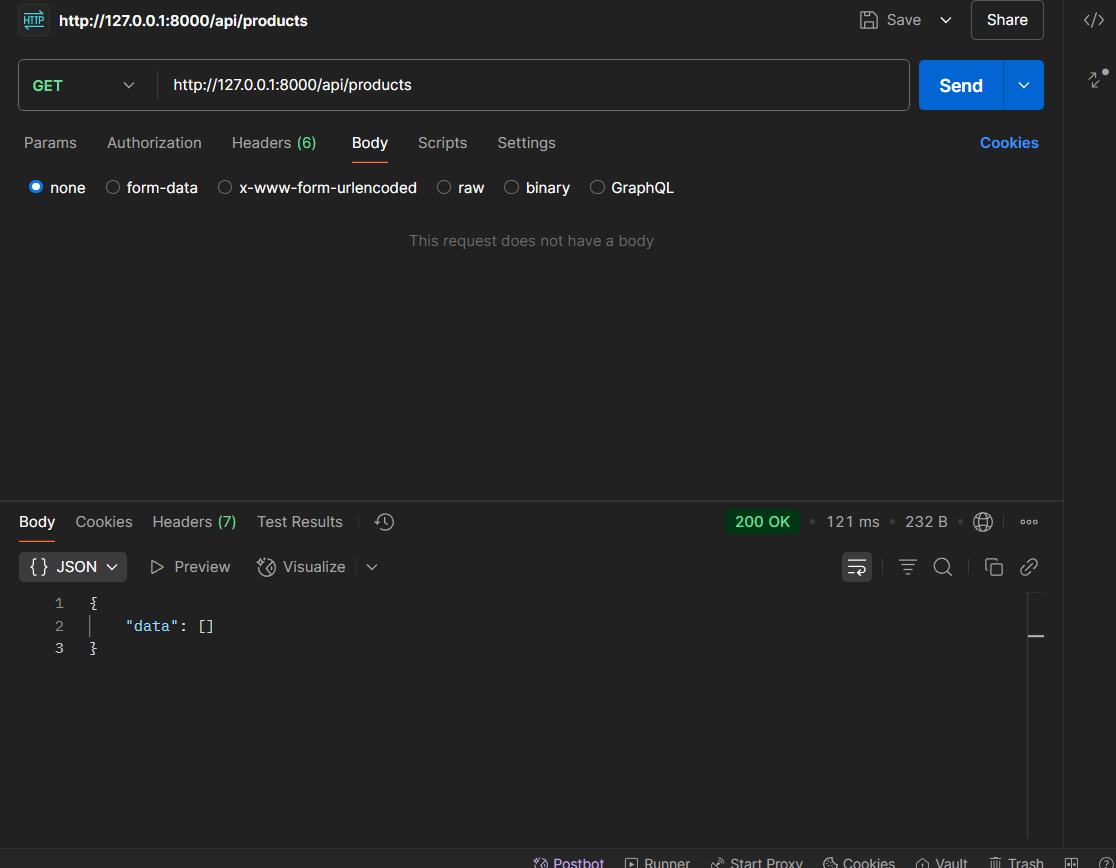
Mengapa URL yang diperlukan adalah api/products, bukan /products? Karena, route kita berada di api.php sehingga Laravel akan otomatin menggunakan prefix berdasarkan routes yang dibuat. Namun, jika kita masukkan API Routes tadi kedalam file web.php, maka prefix yang digunakan adalah 127.0.0.1:8000/products.
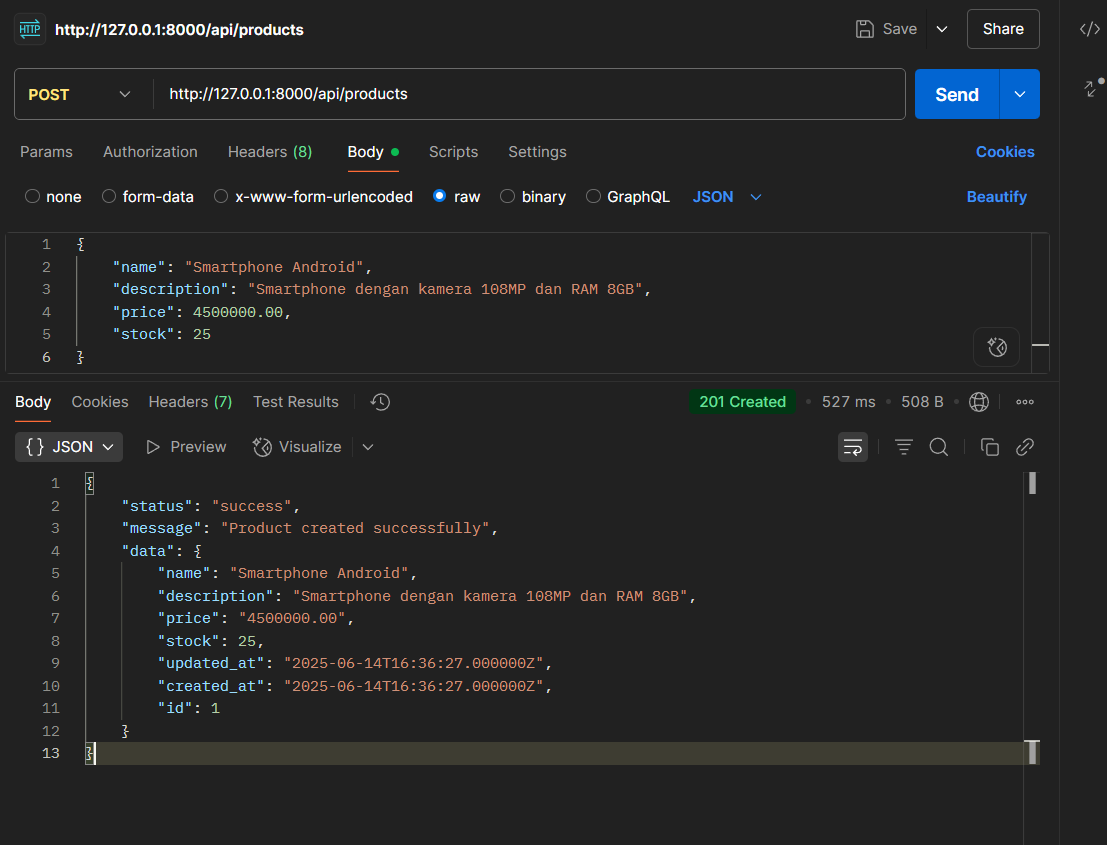
Kemudian, kita akan mencoba untuk menambahkan product. Caranya dengan menggunakan URL berikut di Postman:
URL: http://127.0.0.1:8000/api/products
Method: POST
Untuk body JSON nya adalah seperti berikut:
{
"name": "Smartphone Android",
"description": "Smartphone dengan kamera 108MP dan RAM 8GB",
"price": 4500000.00,
"stock": 25
}
Masukkan JSON diatas di Postman, kemudian Send. Jika berhasil, maka akan mendapat respons seperti berikut:
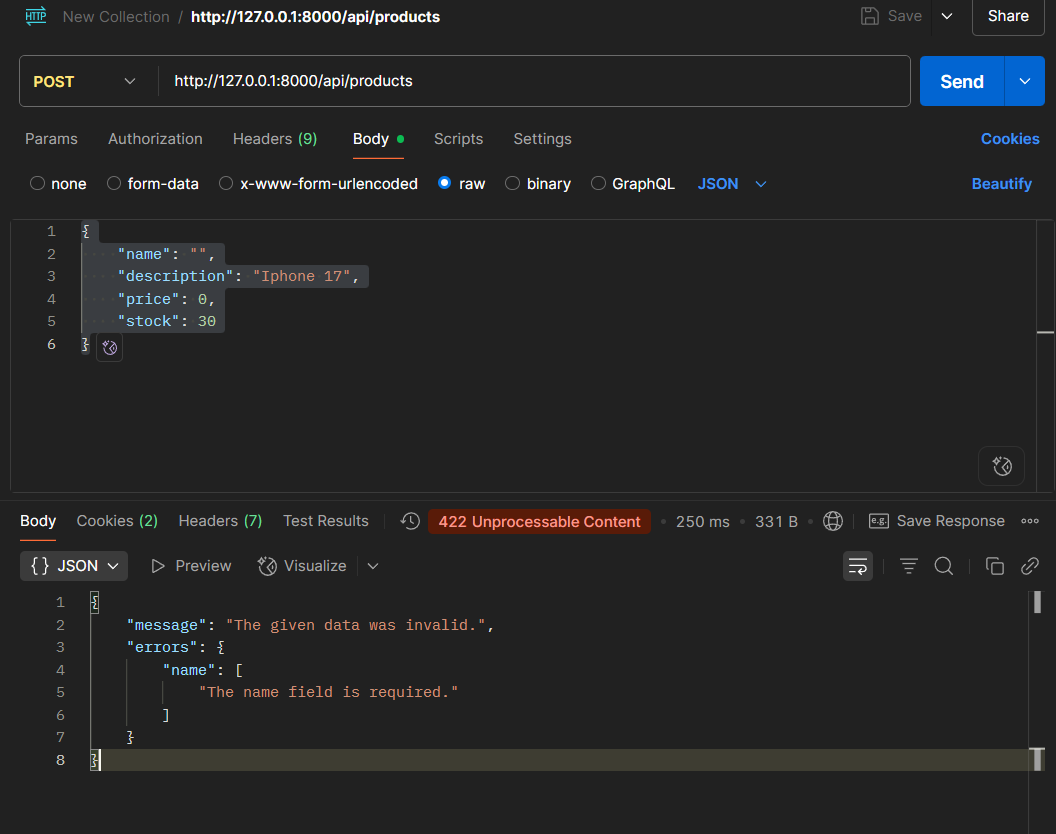
Jika kita ingin menerapkan handling untuk exception memasukkan data yang salah, tambahkan kode berikut di controller:
use Illuminate\Support\Facades\Validator;
public function store(Request $request)
    {
        $validator = Validator::make($request->all(), [
            'name' => 'required|string|max:255',
            'description' => 'required|string',
            'price' => 'required|numeric|min:0',
            'stock' => 'required|integer|min:0',
        ]);

        if ($validator->fails()) {
            return response()->json([
                'message' => 'The given data was invalid.',
                'errors' => $validator->errors()
            ], 422);
        }

        $validatedData = $validator->validated();

        $product = Product::create($validatedData);

        return response()->json([
            'message' => 'Product created successfully!',
            'product' => $product
        ], 201);
}Cobalah untuk memasukkan data yang salah seperti berikut
{
    "name": "",
    "description": "Iphone 17",
    "price": 0,
    "stock": 30
}
Hasilnya akan seperti berikut:
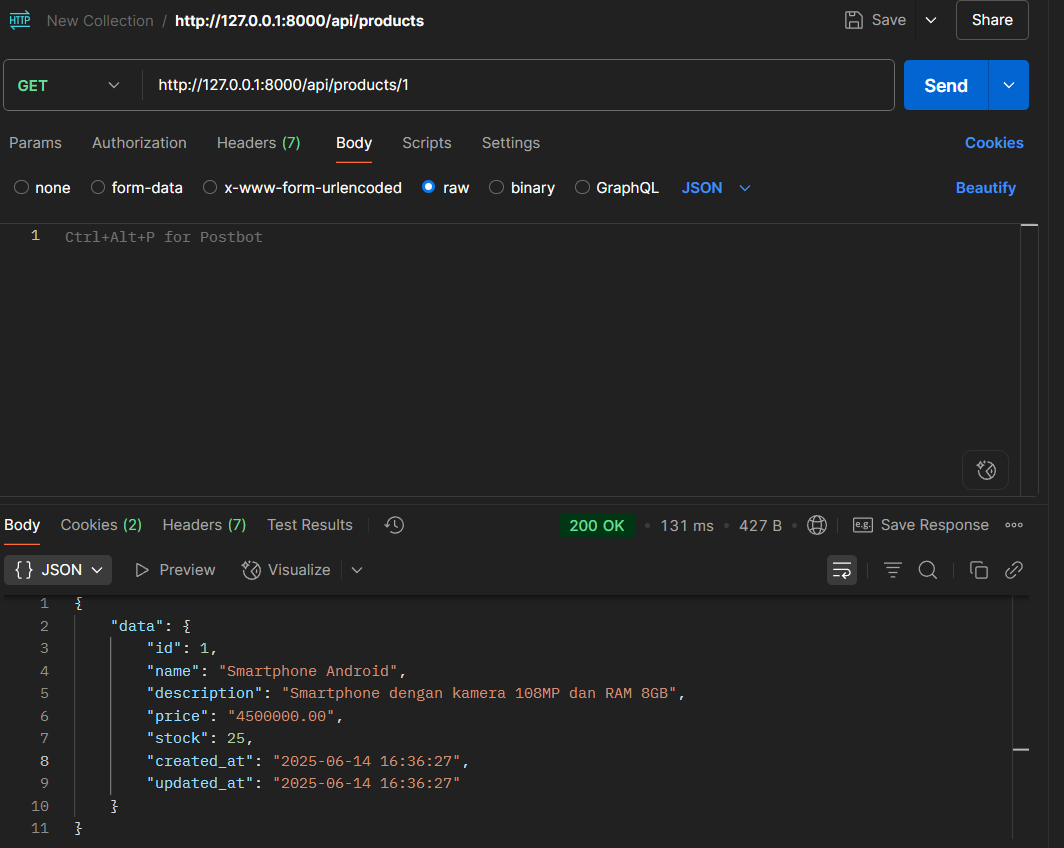
Kemudian, kita coba mengambil sebuah produk berdasarkan ID. Caranya dengan menggunakan url berikut di Postman:
URL: http://localhost:8000/api/products/{id}
Contoh: http://localhost:8000/api/products/1
Method: GET
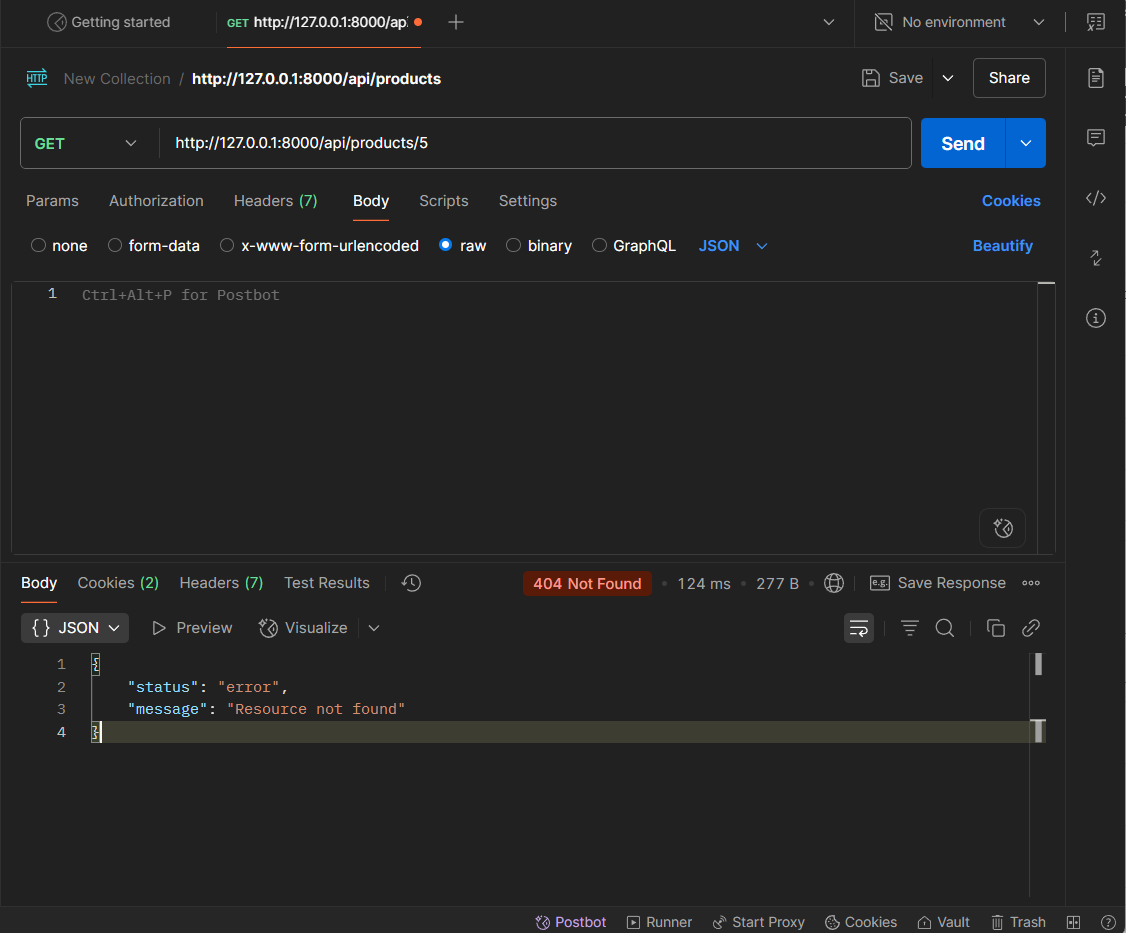
Jika ingin menampilkan kode 404 saat id tidak ditemukan, tambahkan kode berikut:
public function show($id)
    {
        $product = Product::find($id);

        if (!$product) {
            return response()->json([
                'status' => 'error',
                'message' => 'Resource not found'
            ], 404);
        }

        // If the product is found, return the ProductResource
        return new ProductResource($product);
} Hasilnya akan seperti berikut:
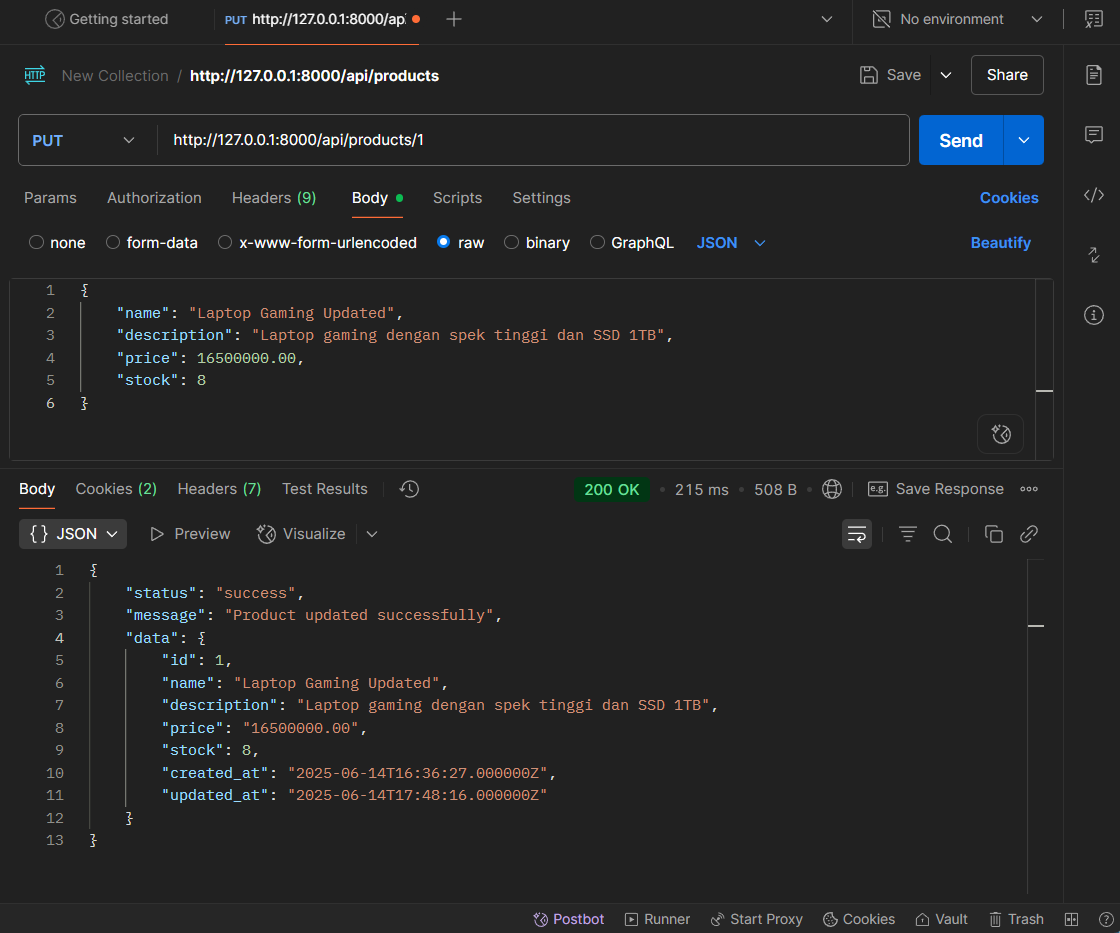
Selanjutnya, untuk update data gunakan URL berikut di Postman:
URL: http://localhost:8000/api/products/{id}
Contoh: http://localhost:8000/api/products/1
Method: PUT
Masukkan contoh data berikut:
{
    "name": "Laptop Gaming Updated",
    "description": "Laptop gaming dengan spek tinggi dan SSD 1TB",
    "price": 16500000.00,
    "stock": 8
}
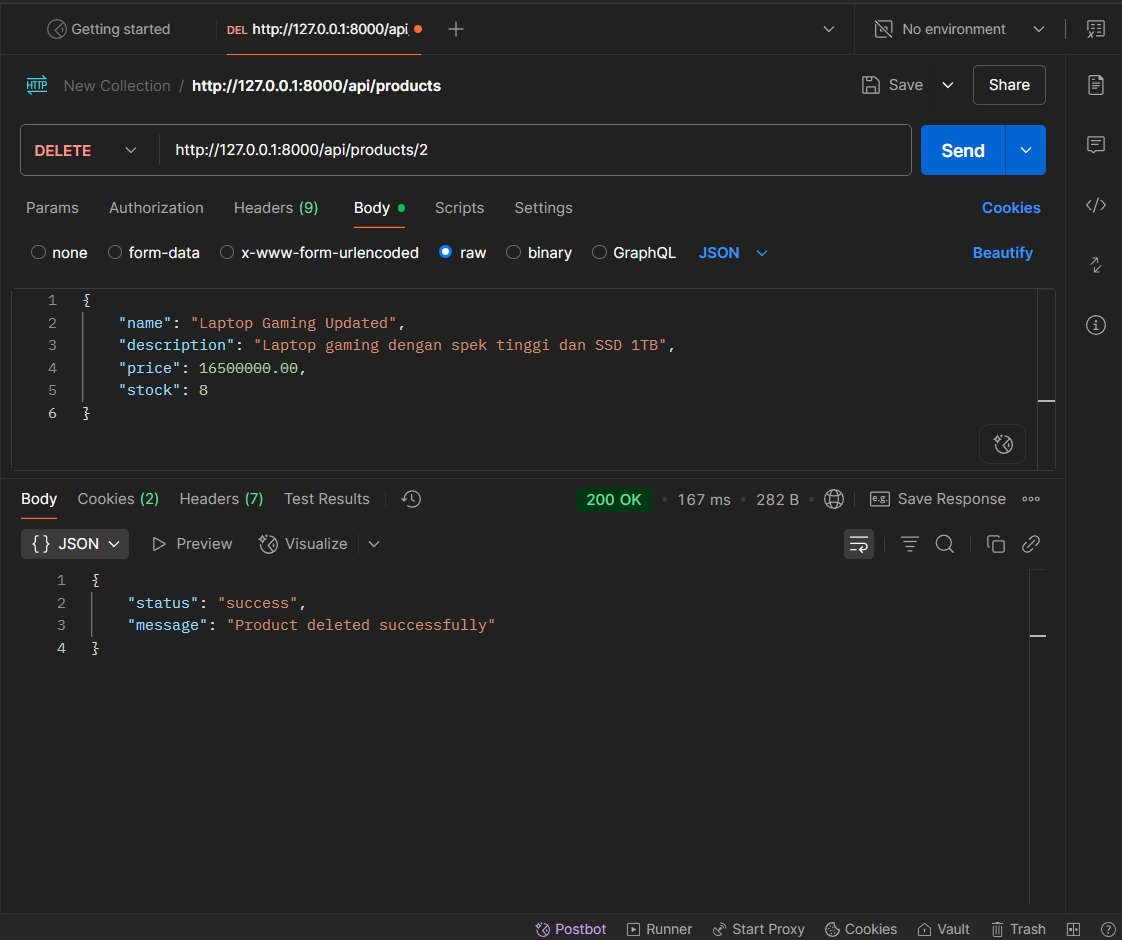
Selanjutnya, untuk menghapus (delete) data gunakan URL berikut di Postman:
URL: http://localhost:8000/api/products/{id}
Contoh: http://localhost:8000/api/products/1
Method: DELETE
Hasilnya akan menjadi seperti berikut:
Tinggalkan Komentar
Komentar
Belum ada komentar.